
Computers
Expert Reviews, Buying Guides & Recommendations
Discover expert reviews, comparisons, and buying guides for desktop PCs, laptops, mini PCs, and workstations.
Beelink EQ14
Beelink SER8 Ryzen 7 8745HS
Beelink SER8 Ryzen 7 8845HS
Minisforum UM790 Pro
Minisforum MS-01
The Best Low-Power Mini PCs for Proxmox and Homelabs in 2026
Disclaimer: This site is reader-supported. When you buy through links on my page, I may earn an affiliate commission at no extra cost to you.
Mini PCs have become increasingly the choice among homelab users for their
- compact size
- low power consumotin and
- impressive performance
- no noise
A mini PC can work and performs impressively as a normal enterprise-grade server with very low power consumption (about 10 times less consumptions with normal enterprise-grade servers), with almost no noise (when compared to normal enterprise-grade servers), and ineredebly little space.
For running
- virtual machines on a complete Proxmox environmen
- to run Plex and Docker containers
- Home Assistant…
Here we will observe some of the best mini PCs for Proxmox and homelab deployment and implementation and discuss the essential characteristics to consider prior to purchasing.
Mini PC features required to run Proxmox smoothly
When choosing a mini PC for virtualization, consider the following:
Processor Performance
Proxmox relies heavily on CPU capabilities. It is good to have modern Intel Core, AMD Ryzen, or Intel N-series processors depending, on the work you want to accomoplish.
What is Proxmox? Proxmox turns a single physical computer into an infinite digital sandbox of virtual machines and servers—completely free and open-source. Instead of buying separate computers to host a smart home, a media player, and a coding lab, you install Proxmox on a single Mini PC and easily run them all simultaneously. It is the absolute gold standard for home servers.
Storage Choice
Fast NVMe SSDs are highly recommended to run Proxmox for homelabs than a normal M.2 SATA SSD.
NVMe SSDs are about:
- 14 times faster
- 11 times input/output operations speed
than a normal M.2 SATA SSD.
NVMe SSDs significantly improve VM performance and boot times.
When you buy mini PCs on online markets might be a barebone, which means, without RAM, storage and operating systems.
If so, consider which standards of RAM and storage you buy.
Capacity of Memory
Virtual machines consume RAM resources quickly. It is recommended for mini PCs to have a munimum of 16 GB to run multiple VMs (virtual machines) at a time. 32 GB or more provides a dar more flexibility.
Network Connectivity
It is essential for a mini PC to have multiple Gigabit Ethernet ports for different purposes like firewall setups and building other advanced networking infrustructures. So make sure to check if a mini PC has multiple ethernet ports before you buy it.
Power Consumption
Because power consumption of mini PCs is incredibly low, using them for setting up homelab system is absolutely the best choice nowadays. Since homelabs run 24/7, switching to modern mini PC keeps electricity consumption at an absolute minimum.
The best mini PCs for Proxmox and Homelabs
💰 The Budget King: Beelink EQ14 (Intel Twin Lake N150)
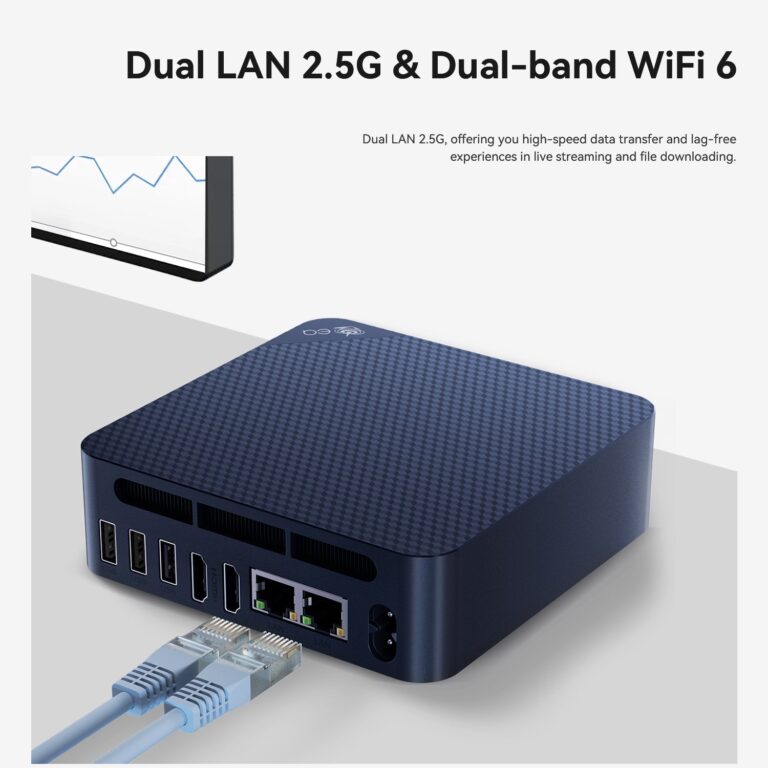
The Beelink EQ14 is one of the most interesting budget Mini PCs released recently.
Key Features
- Intel Twin Lake N150
Ultra-low power: 6W TDP means fanless operation and very quiet
Good for basics: Web browsing, light office tasks, smart home apps
- 16GB RAM
- 500GB SSD as the standard option. If you want faster Proxmox performance, upgrade to an M.2 NVMe PCIe 3.0 x4 NVMe SSD.
- Slot 1 (Primary/System): M.2 2280 PCIe 3.0 x4 (NVMe) with a max capacity of 4TB
- Slot 2 (Secondary/Storage): M.2 2280 PCIe 3.0 x1 (NVMe only) with a max capacity of 4TB
- Dual 2.5GbE LAN
- Supports Wi-Fi 6
See which NVMe SSDs are compatible with the Beelink EQ14 and choose the right storage upgrade for your needs.
Why It Is Great For Proxmox?
Although the N150 is not designed for heavy virtualization(only 4-5 VMs), it performs surprisingly well for lightweight homelab workloads.
Typical use cases include:
- Home Assistant
- Pi-hole
- VPN server
- Docker containers
- File server
- Monitoring tools
The dual 2.5GbE ports are particularly valuable for networking projects, firewall labs, and virtualized routing environments.
Advantages
- Extremely low power consumption
- Quiet operation (very little noise while running)
- Affordable price
- Excellent networking features
Limitations
- Not suitable for large VM clusters
- Limited CPU resources for intensive workloads
Best For
Beginners building their first Proxmox server.
How many virtual machines the Beelink EQ14 (Intel N150) can realistically handle?
Click on the button below.
Compare prices and availability across trusted retailers:
Disclaimer: This site is reader-supported. When you buy through links on my page, I may earn an affiliate commission at no extra cost to you.
Click below to view current pricing, specs, and availability for the
Beelink EQ14 (Intel Twin Lake N150) on Amazon.
Best Value: Beelink SER8
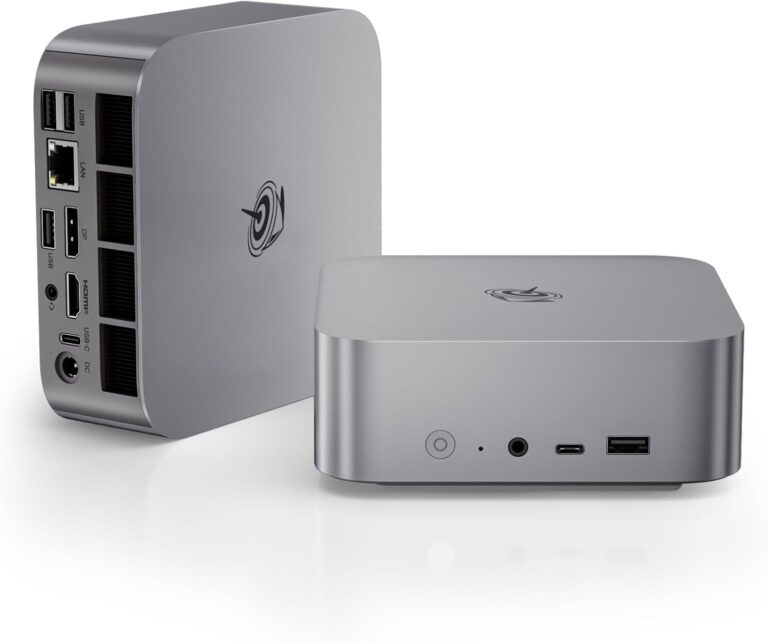
Beelink SER8 8745HS
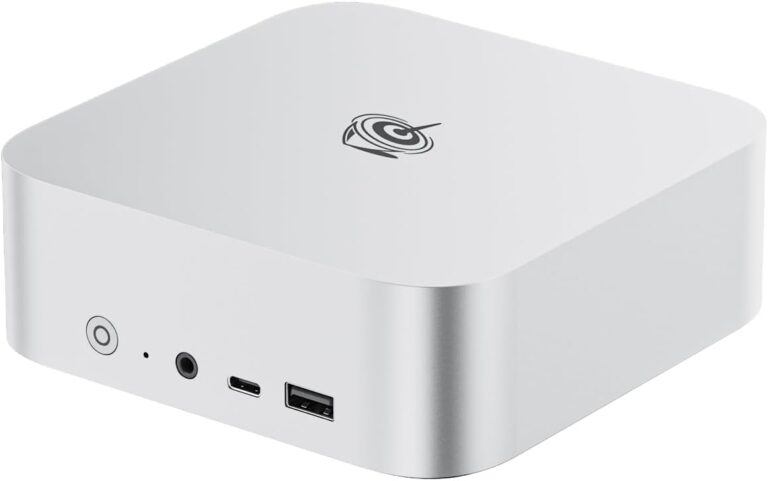
Beelink SER8 8845HS
The Beelink SER8 series represents one of the most refined generations of compact Mini PCs from Beelink.
- Both the 8745HS and 8845HS models share the same chassis,
- cooling system,
- and overall design philosophy, but they differ slightly in CPU configuration, AI capabilities, and efficiency tuning.
In practice, these two systems are extremely close in performance, and the real difference comes down to price, AI features, and efficiency tuning rather than raw speed.
Key Features
- The AMD Ryzen 7 8845HS and AMD Ryzen 7 8745HS, both with 8 cores and 16 threads, are powerful enough to run multiple containers and VMs at the same time
- Their high clock speeds — up to 4.9 GHz on the 8745HS and up to 5.1 GHz on the 8845HS — make them the perfect choice for Proxmox and homelab setups with many containers and VMs.
- Both CPUs support up to 64 GB DDR5 5600 MHz RAM
Storage
- Fast NVMe storage–
- Both provide two M.2 2280 PCIe 4.0 ×4 NVMe slots (up to 4 TB per slot, 8 TB total),
- more NVMe drives via USB 3.2 external enclosures
Triple Display Support
- 1 × HDMI 2.1
- A very fast and modern HDMI connection for monitors and TVs.
- 1 × DisplayPort 1.4
- multi-monitor layout from a single DisplayPort 1.4 connection
- through MST Hubs (see the picture)
- Daisy Chaining
- multi-monitor layout from a single DisplayPort 1.4 connection
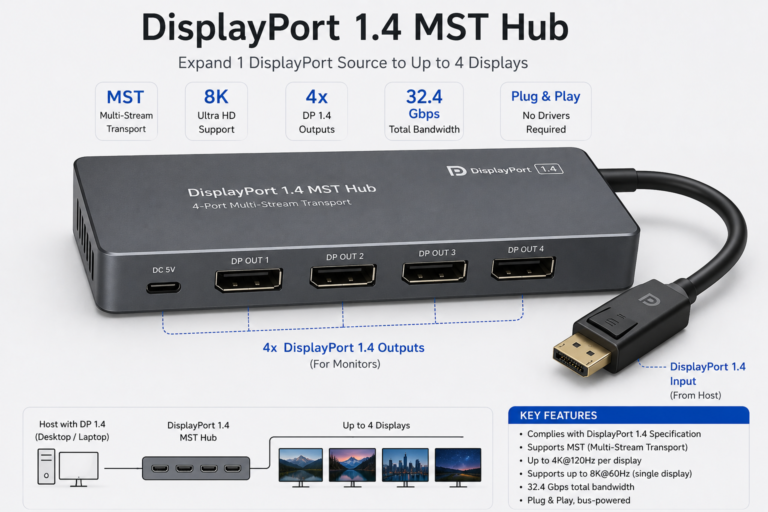
- 1 × USB4 (DisplayPort Alt Mode)
- for external NVMe SSDs
- to connect an external GPU enclosure
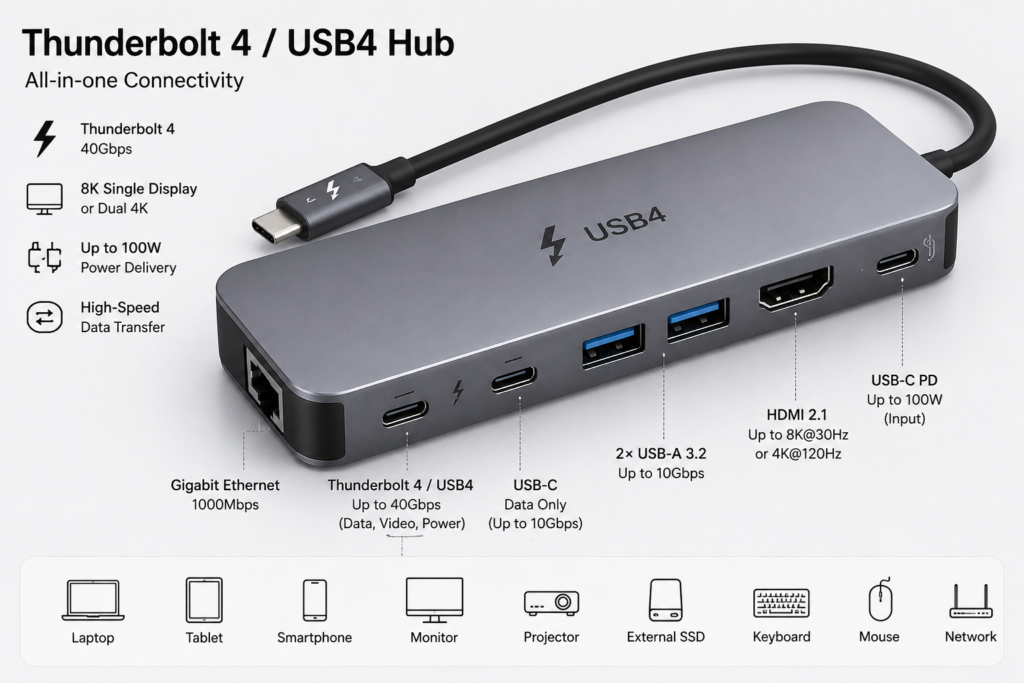
- Run multiple monitors via USB4 docks
- Single-cable expansion for peripherals through Docking Stations
- Through A Thunderbolt 4 / USB4 Hub (see the picture down below)
- multiple high-resolution monitors
- and high-speed NVMe hard drives can be connected simultaneously
- 1 x 2.5GbE networking: 2.5 Gbps is fast enough for most home lab tasks — like running smart home apps, security tools, and personal websites.
Not for 10GbE clusters: If you need 10 Gbps networking for a Proxmox cluster or Ceph storage, the SER8 won’t work — you’d need the Minisforum MS-01 instead
- Power Consumption: Low idle power makes them perfect for a 24/7 homelab server
Both systems are extremely close, and in most real-world scenarios:
- The difference between SER8 8745HS and 8845HS is minor — cooling, noise, and overall user experience are nearly identical.
- In short: The 8845HS is the newer, AI-ready option, but the 8745HS offers almost the same performance for less money.
- SER8 8845HS = slightly more advanced, AI-ready
- SER8 8745HS = better value, same experience
Key Differences Between Ryzen 7 8845HS and 8745HS: Click the Button here
See which NVMe SSDs are compatible with the Beelink SER8 Ryzen 7 8845HS and 8745HS and choose the right storage upgrade for your needs.
Detailed SSD Blueprint Matrix (Beelink SER8 Ryzen 7 8845HS and 8745HS)
Compare prices and availability across trusted retailers:
Disclaimer: This site is reader-supported. When you buy through links on my page, I may earn an affiliate commission at no extra cost to you.
Click below to view current pricing, specs, and availability for the
Beelink SER8 8745HS and Beelink SER8 8845HS on Amazon.
Best Overall: Minisforum UM790 Pro
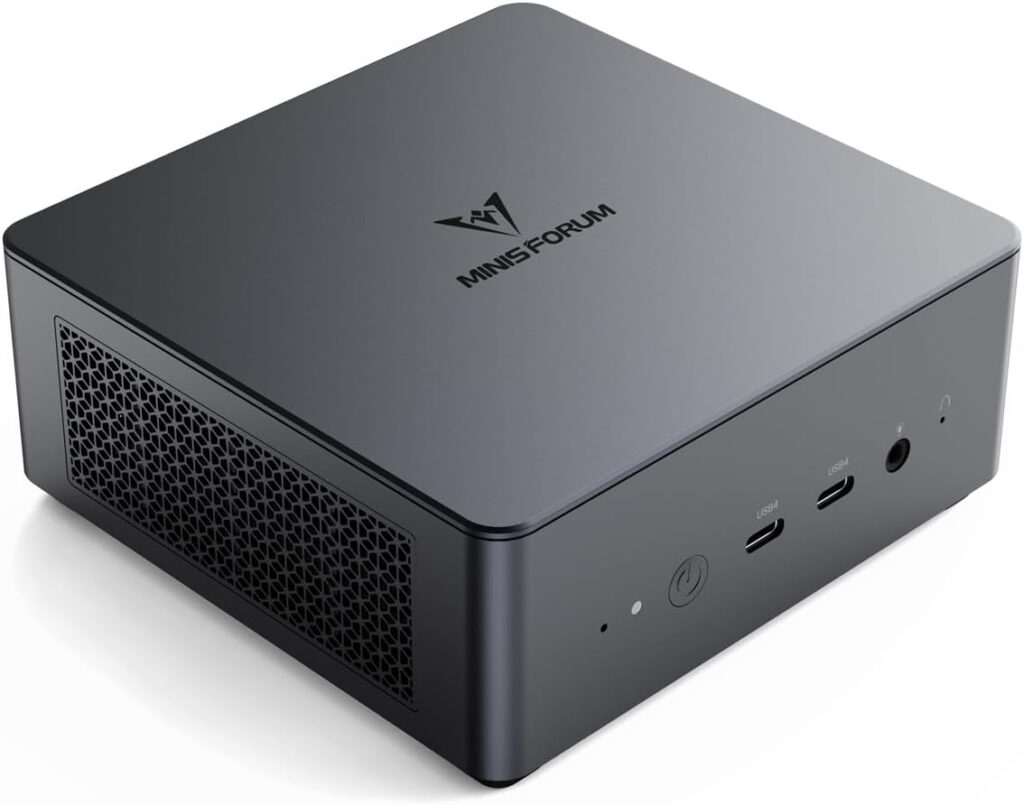
Minisforum UM790 Pro: Front
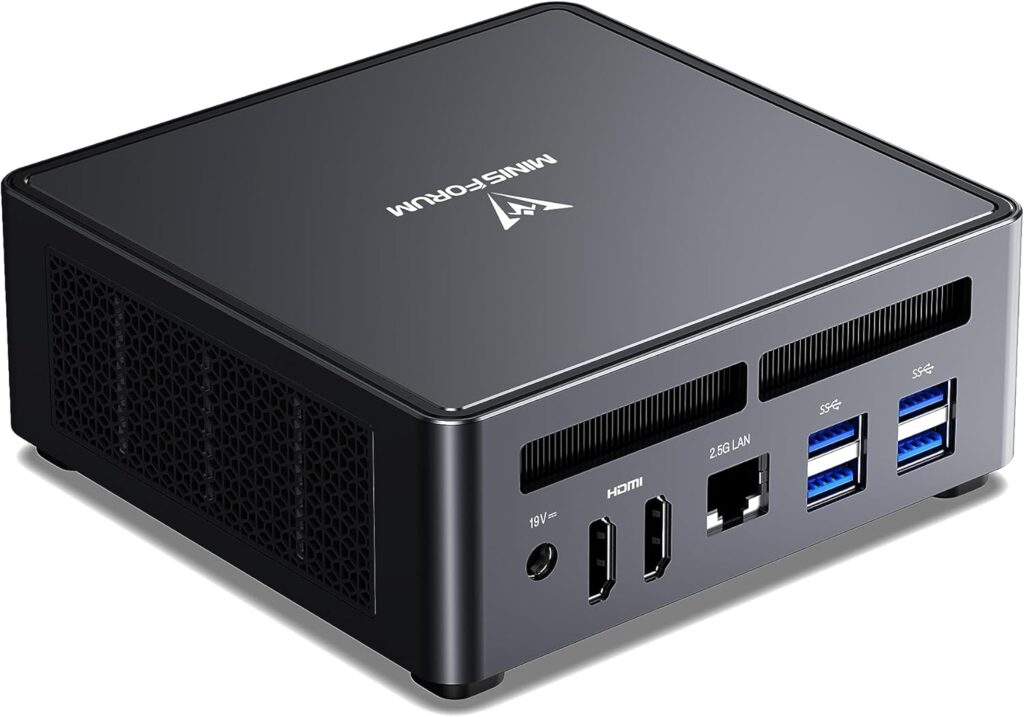
Minisforum UM790 Pro: Rear
The Minisforum UM790 Pro remains one of the strongest Proxmox platforms available for enthusiasts.
Key Features
- AMD Ryzen 9 7940HS
- 8 Cores / 16 Threads -Up to 5.2 Ghz
- Up to 64GB DDR5 RAM
- Community Unofficial Max- 2 x 48= 96GB (the maximum hardware capacity, when you buy barebone kit and install the RAM yourself)
- 2x M.2 2280 PCIe Gen 4.0 NVMe slots – the Minisforum UM790 Pro comes with an NVMe SSD preinstalled in most retail configurations, Usually 512GB or 1TB capacity depending on the bundle.
- If you buy the Barebone version or need to upgrade, you can install according to your need here:
- 2TB on both drives = 4TB , perfect for Standard Proxmox lab, 30+ virtual machines, and a modest media library
- 4TB on both drives = 8TB, perfect for massive database projects, several full Windows Server VMs, and extensive backups center.
- One Critical Warning for the UM790 Pro Storage: If you are buying drives for this machine, do not buy double-sided NVMe SSDs for the primary slot. Double-sided SSDs are too thick. If you force one into the first slot, it will physically smash against the Wi-Fi card underneath it.
- Networking
- 1 × 2.5G RJ45 Ethernet
- Wi-Fi:
- Wi-Fi 6E (M.2 2230 module)
- Bluetooth:
- 5.3
Video outputs
- 2 × HDMI 2.1
- 2 × USB4 (also carry DisplayPort video)
- If you buy the Barebone version or need to upgrade, you can install according to your need here:
- USB Connectors
- Front side USB-C (USB4)
- 2 × USB4 (40 Gbps, USB-C)
- What you use USB4 (40 Gbps) for
External SSDs (biggest real use)
You can plug in:
- NVMe SSD enclosure
- High-end external drives
- High-end docking stations
A USB4 dock can give you:
- HDMI / DisplayPort monitors
- USB ports
- Ethernet
- SD card readers
- Charging (sometimes)
One cable = full desktop setup
- Rear USB-A ports
- 4 × USB-A 3.2 Gen2 (10 Gbps)
- Used for:
- keyboard/mouse
- storage drives
- hubs
- Front side USB-C (USB4)
- PCIe Expansion-None
- What does it mean?
The Minisforum UM790 Pro does not have a standard PCIe expansion slot (such as PCIe x16 or PCIe x4) where you can install expansion cards like:
- Network cards
- RAID controllers
- Capture cards
- GPUs
- What does it mean?
See which NVMe SSDs are compatible with the Minisforum UM790 Pro and choose the right storage upgrade for your needs.
Detailed SSD Blueprint Matrix (Minisforum UM790 Pro)
Why It Is Great For Proxmox
The Ryzen 9 processor provides enough resources for multiple virtual machines (30+) running simultaneously. It is capable of handling Proxmox, Docker, Home Assistant, Plex, and development environments on a single system.
Best For
- Multiple VMs
- Kubernetes labs
- Docker environments
- Advanced homelabs
Need help choosing between 32 GB, 64 GB, and 96 GB RAM?
Compare prices and availability across trusted retailers:
Disclaimer: This site is reader-supported. When you buy through links on my page, I may earn an affiliate commission at no extra cost to you.
Click below to view current pricing, specs, and availability for the
Minisforum UM790 Pro on Amazon.
MS-01: The Ultimate Mini Workstation for Professionals & Homelab Enthusiasts
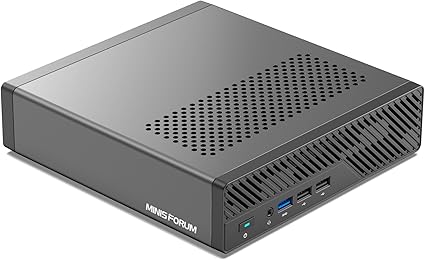
Minisforum MS-01: Front
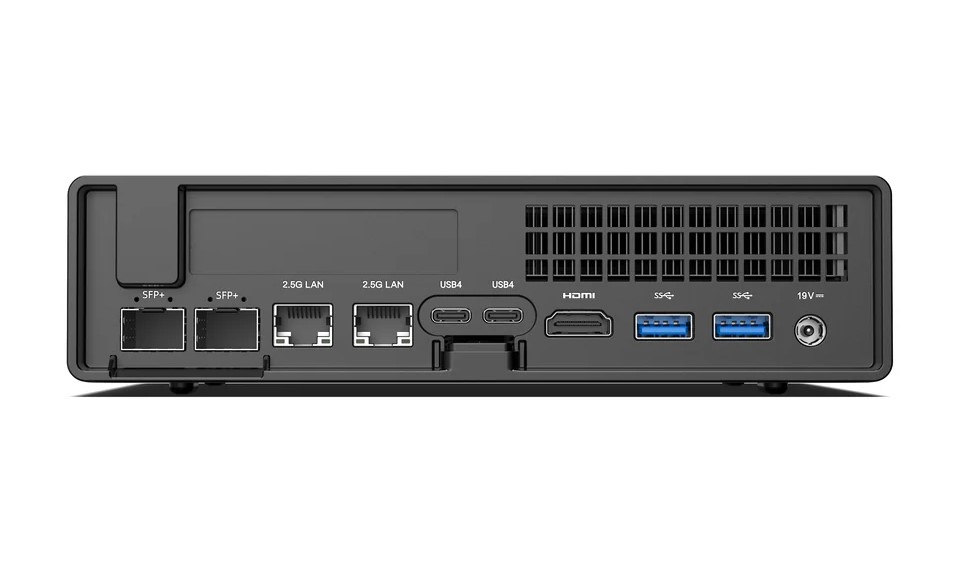
Minisforum MS-01: Rear
The MINISFORUM MS-01 is more than just a mini PC. It is built for workstation-level performance in a compact form factor.
his device is aimed at users who need serious computing power for virtualization, networking, development, and even light server workloads, without moving to a full tower workstation.
Key Highlights of the MINISFORUM MS-01
- Intel Core i9-class performance (13th Gen mobile/desktop hybrid depending on config)
- Multiple high-speed networking ports (including 2.5GbE and higher depending on version)
- 2 × 2.5GbE Ethernet ports
- 2 × 10GbE SFP+ port (this is the most important feature on most MS-01 configs)
- 2x USB4/Thunderbolt ports (This can be used for additional networking bridges or adapters)
- Thunderbolt port: If two PCs are connected through Thunderbolt port, they can talk to each other at blistering speeds (up to 20Gbps or 40Gbps) without needing a switch. The computers see this connection as a standard Ethernet network bridge.
- External Adapters (Dongles): You can plug external adapters into those USB4 ports to get more physical ports. For example, you could buy a USB4-to-10Gbps RJ45 adapter.
- The Catch: Some dedicated hypervisors used in homelabs (like VMware ESXi or Proxmox) can be incredibly picky about USB/Thunderbolt network adapters. They sometimes require custom drivers, can randomly disconnect, or might not be recognized at all.
- Support for multiple NVMe SSDs
- 3 x M.2 NVMe SSD
- Slot 1 (Left / Primary): PCIe 4.0 x4. This slot can also double as a U.2 NVMe slot via an included adapter.
- Slot 2 (Middle): PCIe 3.0 x4.
- Slot 3 (Right): PCIe 3.0 x2 . This slot has lower bandwidth, so it’s best used for a secondary storage or boot drive where max speed isn’t critical.
- ⚠️ A Crucial Warning on Slot 1: If you decide to use a standard M.2 NVMe drive in Slot 1, make sure the manual hardware switch next to the slot is flipped to the M.2 position. If the switch is left in the U.2 position and you plug in a standard M.2 drive, you risk frying the SSD due to the difference in power delivery.
- 3 x M.2 NVMe SSD
- Designed for virtualization and multi-VM workloads
- Compact but highly upgradeable chassis
- RAM can be upgraded (more memory installed)
- NVMe SSDs can be added or replaced
- Sometimes network or expansion options (depends on model)
- Easier access to internals compared to sealed mini PCs
- Strong cooling system for sustained loads
Performance Overview
The MS-01 is designed for users who run:
- Proxmox / VMware ESXi
- Docker + Kubernetes environments
- Multiple Linux servers
- Database workloads
- Development and CI/CD pipelines
This is a system that behaves more like a small enterprise server than a consumer mini PC.
Virtualization & Homelab Power
There are three models of MINISFORUM MS-01:
- Core i5-12600H Variant
- The Specs: 14 Cores / 20 Threads | Max 64GB DDR5 RAM
- runs 8 to 12 standard VMs
- Core i9-12900H Variant
- The Specs: 14 Cores / 20 Threads | Max 64GB DDR5 RAM
- VM Capacity: Handles 15 to 20+ standard VMs.
- Core i9-13900H Varian
- The “Light & Efficient” Tier:
- 30 to 50+ Containers (LXC/Docker)
- Pi-hole, Home Assistant, Plex
- 30 to 50+ Containers (LXC/Docker)
- The “Balanced Homelab” Tier:
- 10 to 20 Standard VMs
- A couple of Windows Server VMs, a few Ubuntu desktop instances, a dedicated pfSense/OPNsense firewall
- 10 to 20 Standard VMs
- The “Light & Efficient” Tier:
- The “Heavy Enterprise” Tier:
- 3 to 5 Heavy VMs
- Deep-dive Kubernetes nodes, heavy CI/CD build pipelines, or local Windows 11 Enterprise virtual desktops.
- 3 to 5 Heavy VMs
See which NVMe SSDs are compatible with the Minisforum MS-01 and choose the right storage upgrade for your needs.
Detailed SSD Blueprint Matrix (Minisforum MS-01)
Looking to upgrade your mini PC?
Find compatible NVMe SSDs and storage options for each model, including the Beelink EQ14, SER8, UM790 Pro, and MS-01.
Compare prices and availability across trusted retailers:
Disclaimer: This site is reader-supported. When you buy through links on my page, I may earn an affiliate commission at no extra cost to you.
Click below to view current pricing, specs, and availability for the
Minisforum MS-01 on Amazon.
Not sure which mini PC is right for your needs? Compare the Beelink EQ14, UM790 Pro, SER8, and MS-01 side by side, including performance, storage expansion, networking, virtualization capabilities, and recommended workloads.
Looking to upgrade your mini PC?
Laptops & Ultrabooks
Disclosure: Digital Stack Professional is reader-supported. When you purchase through links on our site, we may earn an affiliate commission at no extra cost to you.
Whether you need an ultra-portable laptop for travel, a high-efficiency workstation for productivity, or a budget-friendly daily driver, finding the right specs is key. Below are our top tested and vetted laptop recommendations based on performance, battery life, display quality, and overall value.
Top Categories
How to Choose the Right Category for Your Needs
With so many options available, picking the right laptop comes down to matching your daily workload to the right machine tier. Here is how to find your ideal fit:
- Best Overall: The ultimate sweet spot. Choose this if you want a reliable, high-performance daily driver that balances battery life, weight, and computing power. It is ideal for remote workers, frequent travelers, and general power users who need an all-around performer without compromises.
- Best for Developers: Built for raw compile speeds and heavy multitasking. Choose this if your day-to-day involves writing code, running local Docker containers, managing virtual machines, or compiling software. These machines prioritize multi-core processor performance, expanded RAM (16GB to 32GB+), and robust Unix/Linux or macOS/Windows flexibility.
- Best Premium: Luxury, design, and top-tier build quality. Choose this if you want an executive-level machine featuring cutting-edge displays (like edge-to-edge OLEDs), ultra-slim CNC aluminum chassis, and premium tactile feel. Perfect for professionals who value aesthetics and premium craftsmanship just as much as performance.
- Best Workstation: Powerhouse performance for intense number-crunching. Choose this if you regularly push your hardware with heavy multi-threaded workloads, massive Excel data models, financial analysis, or basic video/rendering tasks.
- Best Budget: Maximum value without breaking the bank. Choose this if you are a student, casual user, or office professional who needs a dependable, cost-effective daily tool for web browsing, document editing, and remote learning.
| Category | Target Audience | Device Type | OS Platform | Recommended Model | Key Highlight | Primary Specs |
|---|---|---|---|---|---|---|
| Best Overall | Remote Workers & Frequent Travelers | Ultrabook | Windows | ASUS Zenbook S 14 | Premium sub-3 lb chassis, all-day battery & vivid 3K OLED display | Intel Core Ultra 7 / 16GB RAM / 1TB SSD |
| Remote Workers & General Users | Ultrabook | macOS | Apple MacBook Air 13" | Silent fanless chassis with 15+ hour battery life & premium aluminum build | Apple M-Series / 16GB Unified RAM / 512GB SSD | |
| Linux Users & Sysadmins | Ultra-Portable | Linux | System76 Lemur Pro 14 | Pre-installed Pop!_OS/Ubuntu with open-source firmware (Coreboot) & ultra-light chassis (~2.2 lbs) | Intel Core Ultra / 16GB RAM / 512GB NVMe SSD | |
| Best for Developers | Web, Mobile & iOS Engineers | Mobile Workstation | macOS (Unix) | Apple MacBook Pro 14" | Industry-leading single-core compile speeds, high sustained performance & XDR display | Apple M-Series Pro / 24GB Unified RAM / 1TB SSD |
| Enterprise & Backend Developers | Ultra-Portable Workstation | Windows / Enterprise | Lenovo ThinkPad X1 Carbon | Tactile low-fatigue keyboard, durable lightweight chassis & full port selection | Intel Core Ultra 7 / 32GB RAM / 1TB SSD | |
| Linux Engineers & Hardware Modders | Modular / Repairable | Linux / Modular | Framework Laptop 13 | 100% user-repairable design with customizable mainboard and expansion ports | AMD Ryzen 7 / 32GB RAM / 1TB NVMe SSD | |
| Best Premium | Executives & Power Users | Ultrabook | Windows | Dell XPS 14 | Edge-to-edge Glass display aesthetic, premium CNC aluminum chassis & long battery life | Intel Core Ultra 7 / 16GB RAM / 512GB SSD |
| Best Workstation | Remote Workers & Analysts | Compact Portable | Windows | HP OmniBook 14 | High multi-core efficiency for heavy office multitasking & spreadsheet workloads | AMD Ryzen AI 9 / 32GB RAM / 1TB SSD |
| Best Budget | Budget Students & Office Tasks | Compact Portable | Windows | Acer Aspire 14 AI | Solid entry-level price point featuring full USB-A/C connectivity & reliable daily performance | Intel Core Ultra 5 / 8GB RAM / 512GB SSD |
| Budget Value Alternative | Compact Portable | Windows | Lenovo IdeaPad Slim 3 | Exceptional budget daily driver offering great reliability and a generous 16GB RAM configuration | AMD Ryzen / Intel Core i5 / 16GB RAM / 512GB SSD |
Understanding Laptop Form Factors
While our main recommendations focus on specific use cases, physical design determines how a device fits your daily routine. Form Factor describes a laptop's physical footprint, weight, and internal construction—ranging from sub-2.5 lb road-warrior machines to heavy-duty desktop replacements with expandable hardware or maximum cooling.
| Form Factor | Typical Screen Size | Average Weight | Primary Design Goal |
|---|---|---|---|
| 1. Ultra-Portable | 11" – 13.3" | 1.8 – 2.5 lbs (0.8 – 1.1 kg) |
Extreme mobility, minimalist footprint, fanless/low-power builds |
| 2. Ultrabook | 13.3" – 14.0" | 2.4 – 2.9 lbs (1.1 – 1.3 kg) |
Balance of slim profile, premium materials, and all-day battery life |
| 3. Modular / Repairable | 13.5" – 16.0" | 2.8 – 4.5 lbs (1.3 – 2.0 kg) |
DIY upgradeability, user-replaceable ports, mainboards & RAM |
| 4. Compact Portable | 14.0" – 15.6" | 3.0 – 3.6 lbs (1.35 – 1.6 kg) |
Practical daily utility with standard USB-A/C ports & standard cooling |
| 5. Ultra-Portable Workstation | 14.0" – 15.6" | 3.0 – 4.2 lbs (1.35 – 1.9 kg) |
Enterprise-grade security, heavy-duty processing in a thin chassis |
| 6. Mobile Workstation | 15.6" – 17.3" | 4.5 – 7.5+ lbs (2.0 – 3.4+ kg) |
Maximum sustained power, dedicated CAD/AI GPUs & multi-fan cooling |
Deep Dive: Full Specifications, Pros & Cons, and Testing Notes for Every Category
1. Best Overal
ASUS Zenbook S 14
The ideal premium ultraportable for mobile professionals and power users.
Key Specifications
- Native OS: Windows 11 Home / Pro
- OS Flexibility: 🟢 Linux: Fully supported (Fedora 41+, Ubuntu 24.04+) | 🔴 macOS: Not supported (x86 architecture)
- Processor: Intel Core Ultra 7 Series 2 (Lunar Lake — e.g., Ultra 7 258V / 8 Cores)
- Memory & Storage: 16GB LPDDR5X | 1TB PCIe 4.0 NVMe SSD
- Display: 14.0" 3K (2880 x 1800) 120Hz OLED Touchscreen
- Battery Life: Up to 15+ Hours (72Wh Battery)
- Weight & Thickness: 2.65 lbs (1.20 kg) | 0.47 inches (11.9 mm)
- Ports: 2x Thunderbolt 4, 1x USB 3.2 Gen 2 Type-A, 1x HDMI 2.1, Audio Jack
✓ Pros
- Vivid 3K 120Hz OLED display
- Exceptional 15+ hour battery life
- Lightweight, durable Ceraluminum chassis
- Full port selection including USB-A & HDMI
✗ Cons
- RAM is soldered (not user-upgradable)
- OLED screen reflection under direct sunlight
Apple MacBook Air 13" (M4 / M5)
Silent, fanless ultraportable performance with all-day battery life and native dual-display support.
Key Specifications
- Native OS: macOS
- OS Flexibility: 🟡 Windows: Virtual Machine only (via Parallels / UTM) | 🟡 Linux: VM or experimental (Asahi Linux)
- Processor: Apple M-Series Silicon (M4 / M5 System on Chip)
- CPU Cores: 10 (4 Performance / 6 Efficiency)
- Threads: 10 (1 thread per core)
- GPU Cores: Up to 10-Core GPU
- Base Storage: 256GB SSD
- Upgrade Options: 512GB, 1TB, 2TB
- CPU Cores: 10 (4 Super Cores / 6 Efficiency)
- Threads: 10 (1 thread per core)
- GPU Cores: Up to 10-Core GPU
- Base Storage: 256GB SSD
- Upgrade Options: 512GB, 1TB, 2TB
- Memory & Storage: 16GB Unified Memory (Standard Baseline) | 512GB NVMe SSD
- Display: 13.6" Liquid Retina (2560 x 1664) 500 nits, P3 Color
- Battery Life: Up to 18 Hours
- Weight & Thickness: 2.70 lbs (1.24 kg) | 0.44 inches (11.3 mm)
- Ports: 2x Thunderbolt 4 / USB4 (Dual Display Support), MagSafe 3 Charging, Headphone Jack
Apple's M-Series chips (System on Chip) combine the CPU, graphics card, RAM, and Neural Engine into a single silicon architecture. This delivers incredible power efficiency, whisper-quiet operation, and extended battery life across both generations.
The Verdict: The MacBook Air 13" remains the ultimate silent ultraportable in the Apple ecosystem. With a fanless design, class-leading glass trackpad, and 16GB standard base memory, it easily handles everyday multitasking, office suites, photo editing, and software development.
Which One Should You Buy?
- Buy the M4 Model (Best Value): Perfect for 90% of buyers looking for maximum performance per dollar in daily productivity, web browsing, and dual-monitor docking setups.
- Buy the M5 Model (Best Performance): Choose the M5 if you need maximum local AI processing headroom, heavier GPU tasks, or want to future-proof your setup for years to come.
✓ Pros
- 100% fanless, completely silent operation
- Generous 16GB base memory standard
- Supports dual external monitors in clamshell mode
- Industry-leading battery life & unibody build
✗ Cons
- No USB-A or HDMI ports (requires USB-C hub)
- Memory and storage are soldered (not upgradable)
System76 Lemur Pro 14
An ultra-lightweight Linux laptop with open-source firmware and maximum battery capacity.
Key Specifications
- Native OS: Pop!_OS or Ubuntu Linux
- OS Flexibility: 🟢 Windows: Fully supported (Installable via ISO) | 🔴 macOS: Not supported
- Processor: Intel Core Ultra Series 3 (Panther Lake — e.g., Ultra X7 358H or Ultra 5 325)
- Memory & Storage: 16GB DDR5 (Upgradable) | 512GB M.2 PCIe 4.0 SSD
- Display: 14.0" Full HD (1920 x 1080) Matte Display
- Battery Life: Up to 14 Hours
- Weight & Thickness: 2.20 lbs (1.00 kg) | 0.65 inches (16.5 mm)
- Ports: Thunderbolt 4, USB 3.2 Gen 2 Type-C, USB 3.2 Gen 1 Type-A, MicroSD, HDMI
✓ Pros
- Pre-installed Linux with zero driver hassle
- Ultra-lightweight chassis (2.2 lbs)
- Open-source Coreboot firmware for enhanced security
- Upgradable M.2 SSD and RAM slots
✗ Cons
- Chassis feel is less premium than aluminum ultrabooks
- Display brightness capped at 300 nits
2. Best for Developers
Apple MacBook Pro 14"
Industry-leading compile speeds, sustained multi-core power, and exceptional battery life.
Key Specifications
- Native OS: macOS (Unix-based environment out of the box)
- OS Flexibility: 🟡 Windows: Virtual Machine only (Parallels / UTM) | 🟡 Linux: Docker / VM / Asahi Linux (Experimental)
- Processor: Apple M-Series Pro (15-Core CPU / 16-Core GPU)
- Memory & Storage: Unified Memory | 1TB PCIe SSD
- Display: 14.2" Liquid Retina XDR (3024 x 1964) 120Hz ProMotion
- Battery Life: Up to 18+ Hours (72.4Wh Battery)
- Weight & Thickness: 3.50 lbs (1.61 kg) | 0.61 inches (15.5 mm)
- Ports: 3x Thunderbolt 4, 1x HDMI 2.1, SDXC Card Reader, MagSafe 3, Audio Jack
✓ Pros
- Class-leading single-core and multi-core compile speeds
- Required native environment for iOS / macOS development
- Incredible battery performance under high CPU load
- Stunning 120Hz Liquid Retina XDR display
✗ Cons
- High initial price tag for higher Unified Memory tiers
- RAM and SSD are completely non-upgradable
Lenovo ThinkPad X1 Carbon
Tactile keyboard precision, rock-solid Linux/WSL2 integration, and ultra-durable build.
Key Specifications
- Native OS: Windows 11 Pro / Linux Certified
- OS Flexibility: 🟢 Linux: 100% Native Support (Fedora / Ubuntu) | 🟢 WSL2: Native full Linux kernel support
- Processor: Intel Core Ultra 7 (Series 2)
- Memory & Storage: 32GB LPDDR5X | 1TB PCIe 4.0 NVMe SSD
- Display: 14.0" 2.8K (2880 x 1800) OLED Anti-Glare Display (Touch Screen on configurable options)
- Weight & Thickness: 2.42 lbs (1.09 kg) | 0.59 inches (14.9 mm)
- Ports: 2x Thunderbolt 4, 2x USB 3.2 Gen 1 Type-A, 1x HDMI 2.1, Audio Jack
✓ Pros
- Best-in-class tactile keyboard for fatigue-free typing
- Official Linux certification (Ubuntu / Red Hat / Fedora)
- Featherweight carbon-fiber chassis (2.42 lbs)
- Excellent port selection without needing dongles
✗ Cons
- Soldered memory limits post-purchase upgrades
- OLED configuration reduces total battery runtime
Framework Laptop 13
100% user-repairable, modular port architecture, and total hardware autonomy.
Key Specifications
- Native OS: DIY / Pop!_OS / Ubuntu / Fedora / Windows 11
- OS Flexibility: 🟢 Linux: Flawless native driver support | 🟢 Windows: 100% Native support via official driver bundle
Native support via official driver bundle means: All required hardware and chipset drivers install automatically via a single official installer file. - Upgradability: 100% modular (Swappable mainboards, RAM, storage, and I/O ports)
Unlike traditional soldered laptops where upgrading the CPU requires buying a whole new machine, Framework lets you unscrew and swap out just the mainboard for a newer generation. - Processor: AMD Ryzen AI 300 / Intel Core Ultra
- Memory & Storage: Up to 64GB DDR5 (2x SO-DIMM) | Up to 4TB M.2 NVMe SSD
- Display: 13.5" 3:2 Aspect Ratio (2256 x 1504) Matte Panel (Touch Screen on 2.8K upgrade option)
- Battery Life: Up to 11+ Hours (61Wh Battery)
- Weight & Thickness: 2.80 lbs (1.30 kg) | 0.62 inches (15.8 mm)
- Ports: 4x Hot-swappable expansion cards (Choose your own modules: USB-C, USB-A, HDMI, DisplayPort, MicroSD, Ethernet)
✓ Pros
- 100% modular, repairable, and upgradeable architecture
- Hot-swappable custom expansion port system (swap USB-A, HDMI, or SD cards on the fly)
- 3:2 display aspect ratio provides extra vertical screen real estate for code
- Outstanding native Linux distro support
✗ Cons
- Speaker output and audio quality are average
- Slightly thicker bezels compared to premium ultrabooks
3. Best Premium
Dell XPS 14 (Model 9440 / DA14260)
Exquisite CNC aluminum craftsmanship, stunning OLED touch canvas, and discrete GPU performance.
Key Specifications
- Native OS: Windows 11 Home (Upgradeable to Pro)
- Developer Environment: Fully supports WSL2 (Windows Subsystem for Linux), enabling a native Linux command-line environment directly inside Windows.
- OS Flexibility: 🟡 Linux: Supported via Ubuntu/Fedora (Requires manual driver tuning for advanced audio/power states)
- Upgradability: ❌ RAM is soldered (Choose wisely at checkout) | 🟢 Storage (M.2 NVMe SSD) is fully upgradeable
- Processor: Intel Core Ultra Series
- Memory & Storage: Up to 32GB LPDDR5X | Up to 1TB PCIe NVMe SSD
- Display: 14.0" 2.8K (2880 x 1800) OLED InfinityEdge (Touch Screen)
- Battery Life: Up to 10-12 Hours (70Wh Battery)
- Weight & Thickness: ~3.70 lbs (1.68 kg) | 0.71 inches (18 mm)
- Ports: 3x Thunderbolt 4 (USB-C), microSDXC Card Reader, 3.5mm Audio Jack (Includes USB-C to USB-A/HDMI adapter in box)
✓ Pros
- Stunning 2.8K OLED touch display with virtually zero bezels
- Exceptional CNC-machined aluminum and Gorilla Glass build
- Powerful discrete GPU options for heavy creative or compile tasks
- Futuristic zero-lattice keyboard and seamless glass touchpad
✗ Cons
- RAM is completely soldered and non-upgradable
- Heavier than ultra-portable machines like the XPS 13 or ThinkPad
4. Best Workstation
HP OmniBook 14
High multi-core efficiency for heavy office multitasking, data analytics, and intense spreadsheet workloads.
Key Specifications
- Native OS: Windows 11 Home / Pro
- OS Flexibility: 🟢 Linux: Fully supported (Ubuntu 24.04+, Fedora 40+) | 🔴 macOS: Not supported
- Processor: AMD Ryzen AI 9 Processor (Multi-Core Powerhouse)
- Memory & Storage: 32GB LPDDR5X | 1TB PCIe 4.0 NVMe SSD
- Display: 14.0" 2.8K OLED Display (Touch Screen)
- Battery Life: Up to 14+ Hours (68Wh Battery)
- Weight & Thickness: 2.95 lbs (1.34 kg) | 0.58 inches (14.7 mm)
- Ports: 2x USB4 / Thunderbolt-compatible, 1x USB Type-A, 1x HDMI 2.1, Headphone/Mic Combo
✓ Pros
- High multi-core throughput for heavy analytical workloads
- Generous 32GB RAM capacity out of the box
- Crisp 2.8K OLED display with excellent contrast
- Sustained efficiency under heavy office multitasking
✗ Cons
- RAM is soldered and non-expandable
- Integrated graphics limit heavy 3D rendering tasks
5. Best Budget
Acer Aspire 14 AI
Solid entry-level price point featuring modern efficiency and full legacy port selection.
Key Specifications
- Native OS: Windows 11 Home
- OS Flexibility: 🟢 Linux: Fully supported (Ubuntu / Fedora) | 🔴 macOS: Not supported (x86 architecture)
- Processor: Intel Core Ultra 5 / AMD Ryzen 5
- Memory & Storage: 8GB / 16GB LPDDR5X | 512GB PCIe 4.0 NVMe SSD
- Display: 14.0" WUXGA / OLED Display (Touch Screen)
- Battery Life: Up to 11+ Hours (58Wh Battery)
- Weight & Thickness: 3.19 lbs (1.45 kg) | 0.70 inches (17.9 mm)
- Ports: 2x USB-C (Thunderbolt 4 / USB4), 2x USB 3.2 Gen 1 Type-A, 1x HDMI 2.1, Audio Jack
✓ Pros
- Excellent value-to-performance ratio for daily tasks
- Full port connectivity including legacy USB-A & HDMI
- Productive 16:10 aspect ratio for extra vertical viewing space
- Reliable battery runtime for school or office work
✗ Cons
- Base model comes with 8GB RAM (soldered)
- Display color accuracy is basic (best suited indoors)
Lenovo IdeaPad Slim 3
An exceptional budget-friendly daily driver offering great reliability, lightweight portability, and solid battery life.
Key Specifications
- Native OS: Windows 11 Home (Upgradable to Pro)
- OS Flexibility: 🟢 Linux: Fully supported (Ubuntu / Fedora) | 🔴 macOS: Not supported
- Processor: AMD Ryzen 5 / Intel Core i5
- Memory & Storage: 16GB RAM | 512GB NVMe SSD
- Display: 15.6" FHD (1920 x 1080) Anti-Glare Display
- Battery Life: Up to 9+ Hours
- Weight & Thickness: 3.63 lbs (1.62 kg) | 0.70 inches (17.9 mm)
- Ports: USB-C (Power Delivery / DisplayPort), USB-A ports, HDMI, SD Card Reader, Audio Jack
✓ Pros
- Outstanding value for money in the sub-$600 tier
- Generous 16GB RAM configuration for smooth multitasking
- Lightweight and thin chassis for easy portability
- Built-in physical webcam privacy shutter
✗ Cons
- Display brightness is standard indoor-focused
- Plastic chassis build feels ordinary (expected at this price)